Part 5. How Far Solo Development Can Go: Fully Local Real-Time Translation. Building AI Translator with NVIDIA's Open Model Nemotron ASR
I built a tool for English online meetings. It shows what the other person says as Japanese subtitles, and also what that person seems to want. Both speech recognition and the LLM run on one GPU machine at my desk, so the setup is “fully local.” No meeting audio or text is sent outside, and no cloud API is used.
Only publicly available open models are used. Speech recognition is NVIDIA’s Nemotron ASR, and translation, intent, and summaries are handled by Google’s Gemma 4.
In Part 3, I tried local LLMs on my own GPU (RTX 3060, 6 GB VRAM). Translation alone was 3 to 4 seconds behind, so I concluded that “for real-time translation, cloud APIs are the practical choice.” This part revisits that conclusion. With NVIDIA’s open model Nemotron ASR, lightweight speech recognition that runs on a local GPU has become much better, and I think fully local real-time translation is now possible in solo development.
What AI Translator does
AI Translator takes the audio of an English meeting and shows three things on screen.
| Feature | What it does | Time until it appears |
|---|---|---|
| Real-time translation | Translates the other person’s words into Japanese while they are still speaking | About 0.1 s to the first characters (after the text is passed in) |
| Intent and reply ideas | When the other person finishes, shows their position, their intent, and two reply ideas | About 2 s after they finish |
| Summary | Summarizes the conversation section by section and stacks the summaries | About 2 s after a section closes |
On a PC, the tool receives the audio of Zoom, Teams, Meet, and other apps through the browser’s screen-sharing feature (system audio). Meeting apps do not play your own voice through the speakers, so only the other person’s voice comes in. On a phone, the microphone picks up the other person’s voice.
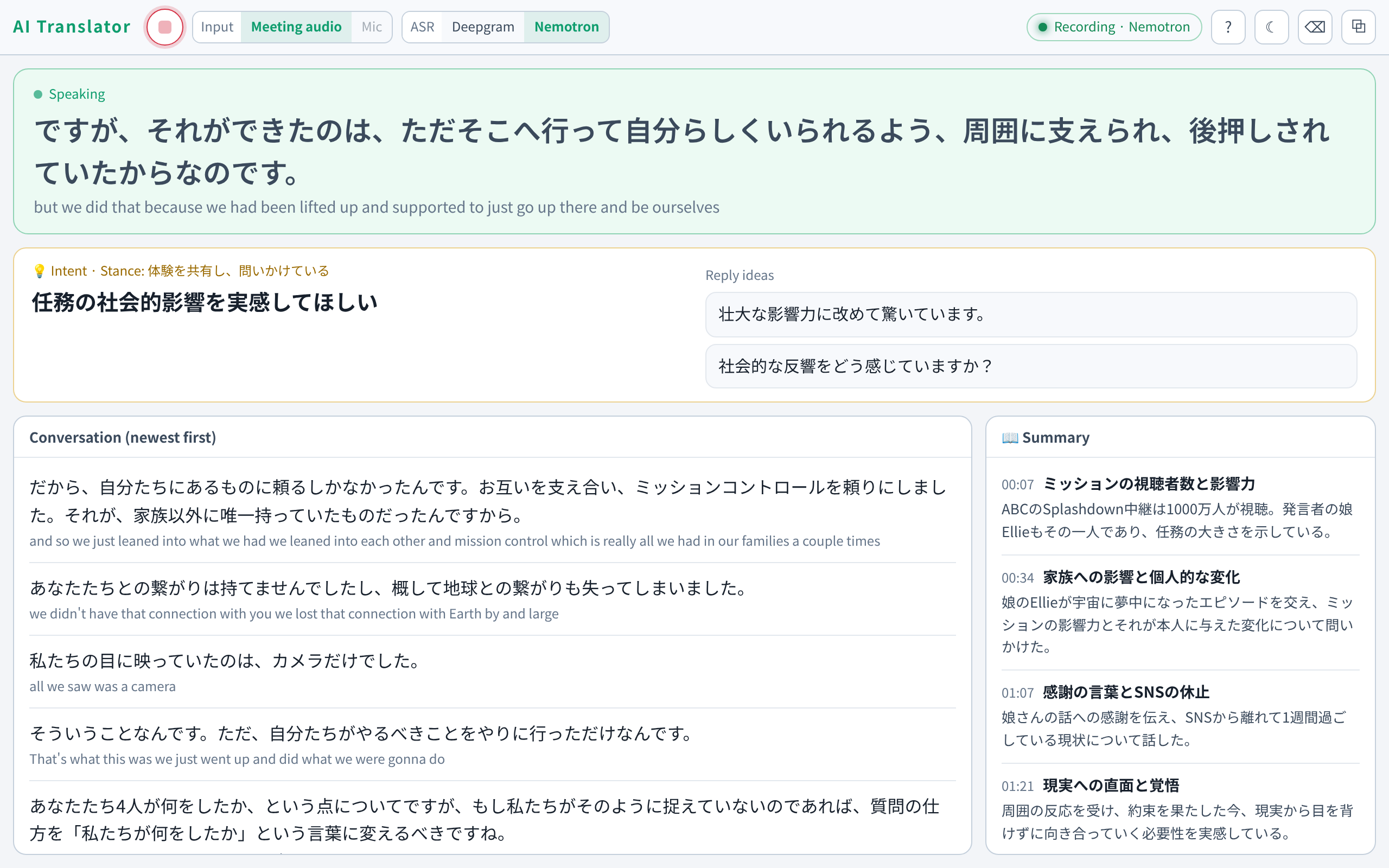
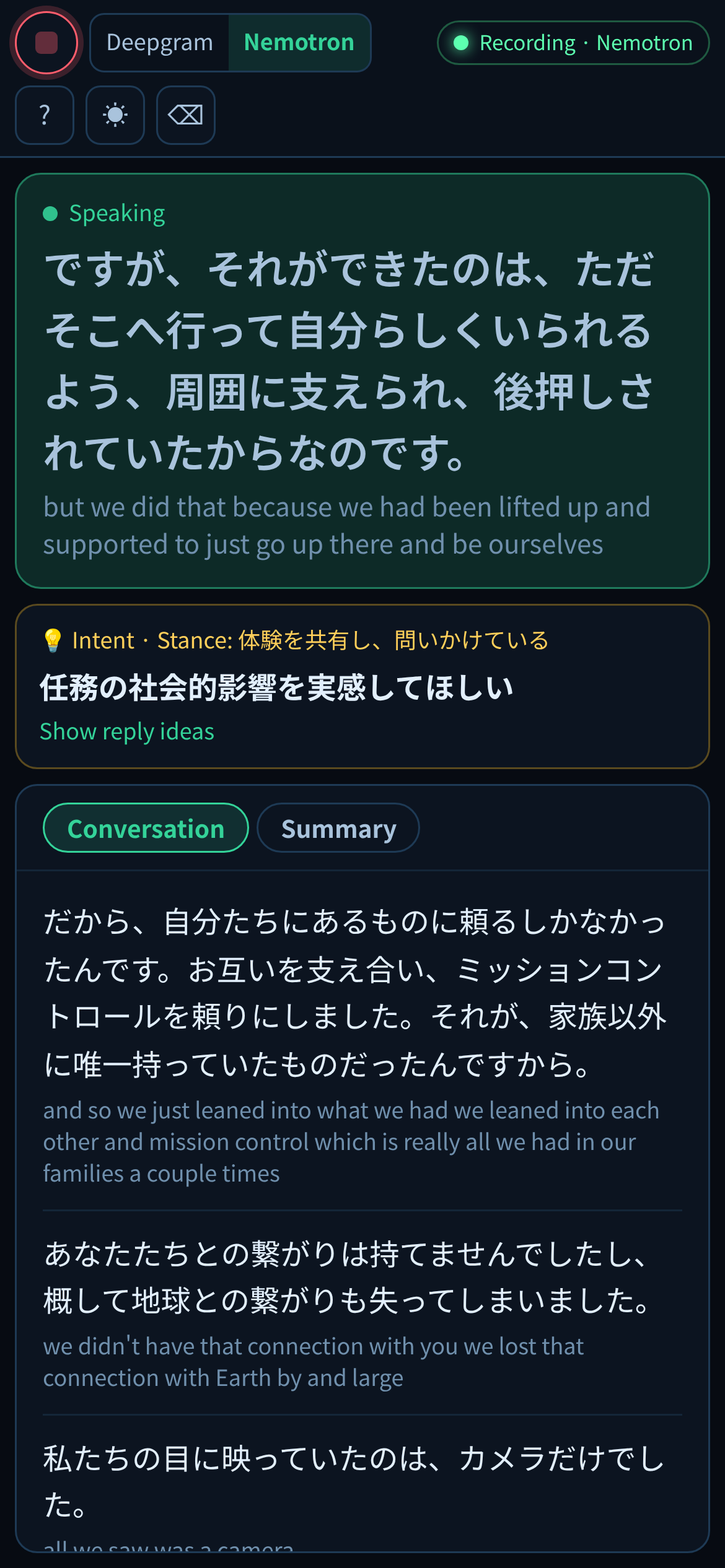
The flow from one utterance to the screen is shown below. The times are values recorded in the demo in the video above.
sequenceDiagram
    participant S as Speaker (English)
    participant A as Nemotron ASR
    participant G as Gemma 4
    participant U as Screen
    S->>A: Starts speaking (0 s)
    A->>U: First transcript (0.81 s)
    A->>G: Partial text
    G->>U: Partial translation (1.75 s)
    S->>A: Finishes the sentence
    A->>G: Final text
    G->>U: Final translation (median 0.74 s after ASR final)
    S->>A: 1 s pause (end of turn)
    A->>G: Last 30 utterances
    G->>U: Intent (about 0.6 s) then two reply ideas (about 1.6 s)
Subtitles and intent on top of the meeting screen
The subtitles and intent can be moved into a small always-on-top window (mini window). Even when the meeting app is full screen, the mini window stays on top. If you make it taller, you can also read the conversation so far and the summary.
Why fully local
Cloud APIs can also be fast. The main reason I chose a fully local setup is that, for meetings, not sending the audio outside has great value in itself.
| Item | Using a cloud API | Fully local (this tool) |
|---|---|---|
| Meeting audio and content | Sent to an external server | Never leaves the machine at my desk. Easier to use for confidential internal meetings, meetings with customers and partners, and talks under NDA |
| Company rules | Cannot be used where a rule says “do not send meeting content to external AI services” | Nothing is sent outside, so it is easier to design a way of use that follows such rules |
| Cost | Charged by time and volume used | No usage fees that grow with use (the machine and electricity cost are separate). Leaving it on all day does not add cost |
| Speed | Audio goes back and forth to a distant server | Everything stays local. The delay until a word appears is less than half of Deepgram’s |
| External service changes | Affected by price changes, service shutdowns, outages, and rate limits | The models are stored locally. They keep running unless I stop them |
| Customization | Limited to the models and settings offered | Prompts, chunk length, and even the models themselves can be changed freely |
| Setup | Account, API key, and payment method | Not needed. Download the models once |
NVIDIA’s open model Nemotron ASR
The key to the fully local setup was Nemotron 3.5 ASR Streaming 0.6B, an open speech recognition model published by NVIDIA. Real-time speech recognition has long been an area where cloud services were strong. In my measurements, Nemotron ASR running on a local GPU showed words sooner after they were spoken than the cloud service Deepgram.
| Feature | Details |
|---|---|
| Small | 600 million parameters. GPU memory per connection is about 2.6 GB. Running it on the same machine as Gemma 4 made translation only about 40 ms slower |
| Built for streaming | It receives audio in chunks (selectable from 80 ms to 1.12 s) and returns text while reusing earlier computation. The chunk size is chosen at inference time, without retraining. I used 320 ms |
| Does not rewrite partial text | Text only grows chunk by chunk, and earlier text is not rewritten (Deepgram rewrote earlier text in about 10% of its partial results). This makes it easier to keep translations from flickering |
| Commercial use | The license is OpenMDW-1.1, and the model card says “This model is ready for commercial use.” |
| Multilingual | It covers 40 languages and locales, including Japanese. I used it only for English this time, but I think it can be extended to two-way meeting translation, such as transcribing Japanese and translating it into English (not yet tested) |
Comparison with the cloud service Deepgram
I compared the two on the AMI Meeting Corpus (recordings of casual four-person meetings, CC BY 4.0) and on read speech (LibriSpeech, CC BY 4.0).
- The delay until a word appears was less than half of Deepgram’s with Nemotron ASR
- The error rate was almost the same on read speech, and about 5 points higher for Nemotron ASR on casual meeting talk
- In casual meetings, overlapping speakers and informal speech raise the error rate for both. For online meetings where you listen to one other person, I expect lower error rates than this (not yet tested)
- My impression from using it on real meeting audio was “Nemotron ASR is faster, and translation quality is about the same”
Nemotron ASR does not send “final” or “end of speech” signals like Deepgram does. So I wrote my own server for Nemotron ASR. It treats text as final when no new word comes for 0.7 seconds, and as the end of speech after a 1-second gap, and it returns results in the same format as Deepgram. This lets me switch between the two with one button on the screen.
How I built it
Architecture: speech recognition and the LLM on one local machine
flowchart LR
    subgraph Client["Browser (PC / phone)"]
        MIC["Meeting audio<br/>(system audio / mic)"]
        UI["Screen / mini window"]
    end
    subgraph GX10["One local GPU machine (ASUS Ascent GX10)"]
        BE["Backend<br/>FastAPI + WebSocket"]
        ASR["NVIDIA Nemotron ASR<br/>0.6B"]
        LLM["Google Gemma 4 26B-A4B<br/>vLLM (FP8)"]
    end
    MIC -- "Audio" --> BE
    BE <--> ASR
    BE -- "Translation / intent / summary" --> LLM
    LLM --> BE
    BE -- "Translation, intent, summary" --> UI
The browser only sends audio and receives translations, intent, and summaries. Speech recognition and the LLM both run inside one GPU machine at my desk.
- Speech recognition: NVIDIA Nemotron ASR (section above)
- LLM: Google’s open model Gemma 4 26B-A4B (Apache 2.0), served in FP8 with vLLM. Three kinds of requests, translation, intent, and summary, are sent to the same model in parallel
- Backend: FastAPI and WebSocket. It joins speech recognition fragments into utterances, detects the end of the other person’s turn, and calls the intent and summary requests
vLLM processes requests that arrive at the same time together, so I did not need separate models for each task. When all three kinds were sent at once, the time to the first characters of a translation stayed almost the same (67 ms to 60 ms), and the full translation went from 469 ms to 666 ms.
flowchart LR
    U["Final utterance"] --> T["Translation<br/>(plain text only)"]
    U --> I["Intent and reply ideas<br/>(JSON)"]
    U --> S["Summary<br/>(JSON)"]
    T --> V["vLLM batches them<br/>one Gemma 4"]
    I --> V
    S --> V
No JSON for translation: time to the first characters became about 1/20
In Part 2, I used the fact that an LLM writes JSON from top to bottom, put the translation field first, and got the translation out sooner. This time I went further: I stopped putting the translation inside JSON and had the model output only the translated text.
A translation inside JSON cannot start until the fields before it (such as an intent category) are written. So I split the work: the translation, which needs speed, is streamed as plain text, and things that need structure, like intent, use JSON in a separate request.
The translated text is sent to the screen once it is complete, not character by character. If it is streamed character by character, the line goes back to one character every time the model re-translates with the next part of the speech, and the text keeps appearing and disappearing, which is hard to read. One translation is complete in 0.3 to 0.8 seconds.
Joining speech recognition fragments into utterances before translating
Speech recognition sometimes finalizes a segment in the middle of a sentence (“…and my task” / “was to source a supplier”). Translating each fragment separately breaks the translation, so fragments are joined into an “utterance” first, and then the final translation is made.
flowchart TD
A["Final ASR fragment"] --> B{"1 s pause<br/>(speaker finished)?"}
B -- "Yes" --> Z["Close the utterance and make the final translation"]
B -- "No" --> C{"Joined text<br/>30 words or more?"}
C -- "Yes" --> Z
C -- "No" --> D{"Short pause and<br/>12 words or more?"}
D -- "Yes" --> Z
D -- "No" --> E{"Nothing for<br/>1.5 s?"}
E -- "Yes" --> Z
E -- "No" --> F["Join with the next fragment<br/>(e.g. "so", "and it was")"]
F --> ANemotron ASR delivers text in batches every 320 ms, so when I made the “final” threshold (0.7 seconds) shorter than that, words were cut in the middle.
Intent: write the speaker’s position first
0.5 seconds after the other person finishes (about 1.5 seconds including the 1-second pause), the last 30 utterances are passed to Gemma 4, which answers in this format.
{"situation":"speaker's position (up to 15 chars)","need":"speaker's intent (up to 30 chars)","ready":true,"replies":["reply 1 (up to 40 chars)","reply 2"]}At first there was no situation field. When I tested with a video of an instructor explaining tips for self-introductions, the intent came out as “wants to know how to introduce themselves,” and the reply idea was “Please teach me.” The model wrote the topic of the talk as the speaker’s want, and then turned it into the listener’s wish in the reply.
| Intent | Reply idea | |
|---|---|---|
Without situation | Wants to know how to introduce themselves | ”Please teach me” |
With situation (first write “explaining”) | Wants the listener to understand why self-introductions matter | A reply that responds to the explanation |
When the model first writes the speaker’s position (asking a question / explaining / complaining, and so on), the intent and reply ideas came to be written from the speaker’s side. The time until the intent appears only went from a median of 0.45 seconds to 0.61 seconds.
Mini window: Document Picture-in-Picture
When I used the tool, my biggest complaint was that I could not see the meeting screen and the translation screen at the same time. So I used Document Picture-in-Picture in Chrome / Edge, and made it possible to move only the subtitles and intent into an always-on-top mini window with one button. It is the same mechanism as picture-in-picture for video.
The mini window only renders the same data as the main screen through a React portal, so networking and recording keep running in the main screen. When the height goes over 300px, a CSS media query shows the “conversation / summary” tabs.
Demo: translating a NASA press conference
Here are some parts of the output used in the first video. All of them were actually produced by the one local machine (Nemotron ASR and Gemma 4), with no edits.
| Time | English (speech recognition result) | Japanese translation |
|---|---|---|
| 0:23 | ten million people watched our network that day just splash down… | その日の着水中継だけで、私たちのネットワークを 1,000 万人が視聴しました。 |
| 0:42 | Ellie go to space | 「エリーも宇宙に行くの」って。 |
| 1:37 | we did what we said we were going to do and now we’ve got to step out… | 私たちは、自分たちがやると決めたことをやり遂げました。そして今、一歩外へ踏み出し、 |
| 2:08 | all we saw was a camera | 私たちの目に映っていたのは、カメラだけでした。 |
In this 157-second demo, 34 utterances received a final translation. The time from the speech recognition final to the final translation was a median of 0.74 seconds, and 1.26 seconds at the 90th percentile.
The intent and summary came out as follows (translated from the Japanese output).
| Scene | Speaker’s position | Intent |
|---|---|---|
| A reporter talks about their daughter, then asks whether the crew feels the weight of the mission | Sharing emotion and asking a question | Wants the crew to understand the weight of what they achieved |
| An astronaut answers, “not what you four did, but what we did” | Talking about their own experience and values | Wants it seen as a team result, not a personal achievement |
Some things did not work well. When the reporter introduced themselves (“I’m Nick Natario with ABC 13”), speech recognition heard “I’m gonna to ring here with ABC thirteen,” and the translation became “I’m calling from here at ABC13.” Proper nouns such as people’s names easily break at the speech recognition stage.
About the videos
- The video and audio are from NASA’s official YouTube channel, NASA’s Artemis II News Conference with Moon Astronauts (April 16, 2026), 8:08 to 10:44. NASA material is generally not subject to copyright. NASA does not endorse and is not involved in this work
- How it was made: I fed the audio in real time into the same system used in production (Nemotron ASR and Gemma 4 on the GX10), and recorded the translations, intent, and summaries with their arrival times. I then played that record into the real UI (the built React app) at the same times, captured it with a headless browser, and overlaid it on the original video
- So this is not a direct screen recording of the Chrome mini window. The text and timing shown are exactly as in the actual output
- For this English article, the UI labels (such as “Speaking” and “Conversation / Summary”) and the captions burned into the video were changed to English. The actual app UI is in Japanese. The translations, intent, and summaries are the actual Japanese output, unchanged
Performance
| Item | Value |
|---|---|
| Translation: first characters / full text (while speaking) | ~0.1 s / ~0.4 s |
| Translation: ASR final → final translation (NASA press conference, 157 s, Nemotron) | Median 0.74 s, p90 1.26 s |
| Translation: same (interview video, 190 s) | Nemotron median 0.92 s / Deepgram 0.80 s |
| Demo: audio start → first transcript / first partial translation | 0.81 s / 1.75 s |
| Intent: start of generation → intent / two replies | ~0.6 s / ~1.6 s |
| Summary: one section | ~2 s |
| GPU resources | Nemotron about 2.6 GB (one connection). Translation only ~40 ms slower when sharing the GPU |
| Display glitches (shrinking, disappearing, duplicates, dropped lines; interview video, 190 s) | 0 in all categories |
How to use
The code is on GitHub (v2.0.0). You need a GPU machine that can run Gemma 4 26B-A4B. The rough steps are below, and the README has the detailed settings.
- On the GPU machine, start Gemma 4 26B-A4B as a vLLM OpenAI-compatible server
- On the same machine, start the Nemotron ASR server (
asr_server/) - Write the GPU machine’s address (
GX10_HOST) in the backend’s (backend/).envand start it - Open
/#meetingin the browser, press ●, and choose “Entire screen” and “Share system audio.” The other person’s voice in the meeting becomes subtitles - Press ⧉ to open the mini window with subtitles and intent
Development environment
I did not use a large compute cluster or the cloud. I built this as a solo project with one GPU machine at my desk. Development, measurement, and making the videos were all done on this machine and my own PC.
| Item | Details |
|---|---|
| Machine | 1 × ASUS Ascent GX10 (NVIDIA GB10 Grace Blackwell, 128 GB unified memory shared by CPU and GPU) |
| OS / software | Ubuntu 24.04 (aarch64) · vLLM (OpenAI-compatible server) · PyTorch 2.13 (CUDA 13) · Transformers 5.22 · FastAPI · React |
| Speech recognition | NVIDIA Nemotron 3.5 ASR Streaming 0.6B (OpenMDW-1.1) |
| LLM | Google Gemma 4 26B-A4B (Apache 2.0), FP8 version (RedHatAI/gemma-4-26B-A4B-it-FP8-Dynamic) |
| UI | Browser (Chrome / Edge on PC, phone). Mini window uses Document Picture-in-Picture |
| Development time | About 2 days (2026-11-03 to 04), solo project. Includes measurement and making the videos |
Notes
- The intent is a guess from the conversation. It can be wrong. For example, at the start of the demo, the host’s announcement “those on the phone, please press star one” got the intent “wants to confirm you are ready to join the queue.”
- This time the source is English and the translation is Japanese. Nemotron ASR supports Japanese transcription, but I have not tried it.
- Nemotron ASR sometimes could not transcribe pronunciation that did not sound like English, and output nothing (checked with synthetic speech). For speakers with strong accents, I switch to Deepgram.
- On a PC, the tool can capture only audio available through screen sharing (Chrome / Edge on Windows). On a phone, only the microphone is used.
- The LLM on the local machine is shared with other work. When it overlaps with heavy jobs, translation can be delayed (there were cases where the first characters took 1 to 5 seconds).
- I have not checked whether the same speed is possible on a CPU-only PC or a typical PC.
Closing
Real-time meeting translation, which I called “practical only with cloud APIs” in Part 3, can now be built in solo development as a fully local setup that does not send audio outside, by using the open models NVIDIA Nemotron ASR and Gemma 4.
- Part 1. Build Your Own Real-Time Translator - Intent-First, Breaking the Silence
- Part 2. Build Your Own Real-Time Translator - LLM Streaming for 500ms
- Part 3. Build Your Own Real-Time Translator - Ollama, LM Studio, and Home GPU
- Part 4 (Appendix). Build Your Own Real-Time Translator - TTS via Bluetooth
- Part 6. Taking Only the Voice Out of Recordings Made in Noisy Places: Trying NVIDIA’s Noise Removal AI “NemotronLabs RE-USE”
- GitHub Repository
Related Posts
Part 1. What Makes the New AI Model "Jev" Special? Reproduced with NerveReflex and an Open Model
What API List Prices Don't Tell You About AI Subscriptions — OpenAI and Anthropic Usage Limits and Pricing Strategies, Seen by a Developer Who Runs AI All Day
