Part 6. Taking Only the Voice Out of Recordings Made in Noisy Places: Trying NVIDIA's Noise Removal AI "NemotronLabs RE-USE"
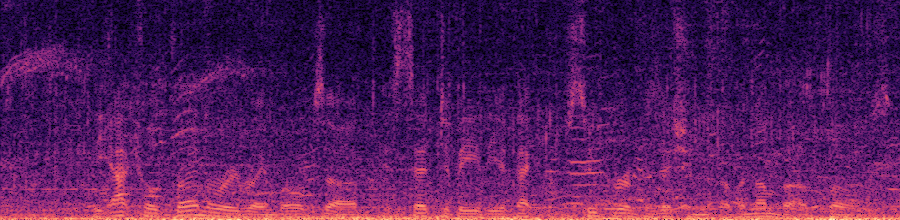
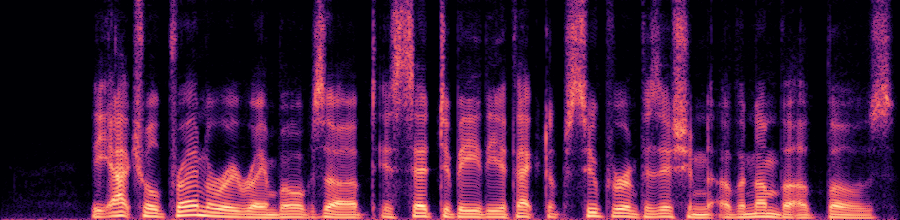
When you record a meeting or an interview in a noisy place, the voice can be buried in the noise, and it is hard to follow when you listen to it again later.
In October 2026, NVIDIA released NVIDIA NemotronLabs RE-USE (RE-USE below) for free. It is an AI model that removes noise from recordings. It belongs to NVIDIA’s Nemotron family, the same family as Nemotron ASR, the speech recognition model I used in Part 5. The model is about 40 MB, roughly the size of one smartphone app. I tried it on the same GPU machine at my desk that I used in Part 5, to see how much noise it removes.
Listen and compare
I used public test recordings that contain noise from places like a cafe, the inside of a bus, a public square, and an office. To make the difference easy to hear, I made the noise 6 times louder. The recordings also come with the original version without noise, so you can compare how close the result gets to the original.
How much noise was removed
By comparing with the original recording without noise, I can measure how much noise is left.
| Before processing | After removing the noise | |
|---|---|---|
| Voice vs. noise | Noise is about 3 times louder than the voice | Voice is about 4 to 5 times louder than the noise |
| Noise you hear while nobody is speaking | Clearly audible | About 1/50, almost silent |
While nobody was speaking, the result was even quieter than the original recording without noise. Small sounds in the room that were in the original recording were also removed.
I also tried 824 test recordings where the noise was not made louder. In an evaluation that gives a score for sound quality, the score went up for 98% of the recordings.
Where it works well
It works well for making recordings from noisy places easier to listen to later.
- Meetings and interviews recorded in a cafe or while traveling
- Voice memos recorded outdoors or in a car
- Recordings that a person listens to again to check, before making a transcript or meeting notes
Processing is fast. On my machine, a one-hour recording took about 8 minutes. For recordings that are already quiet, there is no need to use it.
About RE-USE
| Item | Details |
|---|---|
| Official name | NVIDIA NemotronLabs RE-USE (NVIDIA, released October 2026) |
| Size | About 40 MB (9.6M parameters). Roughly one smartphone app |
| What it can fix | Noise, room echo, clipping, muffled sound, degraded phone-call audio, and more |
| Terms | Free. Commercial use allowed. Requires an NVIDIA GPU |
For an AI model, it is very small. Comparing it with the models I used in Part 5 shows the difference.
| AI | Role | Size (parameters) |
|---|---|---|
| RE-USE | Removes noise | 9.6M (about 40 MB) |
| Nemotron ASR | Turns speech into text | 600M (about 60 times RE-USE) |
| Gemma 4 | Translates | 26B (about 2,700 times RE-USE) |
I tested it on one GPU machine (ASUS Ascent GX10), the same one as in Part 5. The scripts I used for the measurements are on GitHub.
Closing
Even in a recording where the noise was louder than the voice, passing it through this small 40 MB model made the voice clear. It is a useful tool for listening again to recordings made in noisy places, and it runs on one machine at my desk with an NVIDIA GPU.
Audio used: VoiceBank-DEMAND (University of Edinburgh, CC BY 4.0). The audio on this page is a modified version of it.
- Part 1. Build Your Own Real-Time Translator - Intent-First, Breaking the Silence
- Part 2. Build Your Own Real-Time Translator - LLM Streaming for 500ms
- Part 3. Build Your Own Real-Time Translator - Ollama, LM Studio, and Home GPU
- Part 4 (Appendix). Build Your Own Real-Time Translator - TTS via Bluetooth
- Part 5. How Far Solo Development Can Go: Fully Local Real-Time Translation. Building AI Translator with NVIDIA’s Open Model Nemotron ASR
- GitHub Repository
Related Posts
NVIDIA's Trillion-Dollar Compute Vision: How Inference Chip Integration Reveals an All-Encompassing AI Ecosystem

What It Means That Nvidia-Backed Nscale Is Pursuing an 8GW Data Center Site