Part 1: From GANs to Generative AI — Why and How the Migration Happened
Introduction
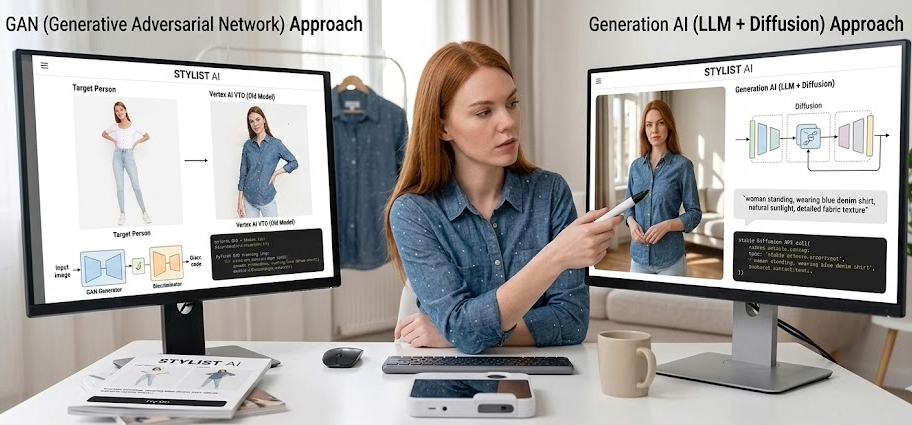
This is the sequel to the META FIT series, which documented the construction of a virtual try-on system using GANs. That series ended with Part 5, acknowledging fundamental limitations in body diversity, processing speed, and garment fidelity.
This new series picks up where that story left off. Over the course of three articles, I will document the migration from a GAN-based pipeline to generative AI — the technical decisions, the implementation, and what the results actually look like.
Part 1 covers the why: how generative AI changed the virtual try-on landscape, the motivation to test it against our own system, and the architectural redesign that replaced an entire GPU pipeline with API calls.
The complete source code is available at github.com/matu79go/metafit.
Generative AI Changed Virtual Try-On
The primary motivation for this migration was straightforward: generative AI had begun to transform virtual try-on from a research problem into a production-ready capability.
In 2024, Google launched AI-powered virtual try-on in Google Shopping. When a shopper selects a garment, the system generates realistic images of diverse body types wearing that item — in real time, powered by generative AI. The very functionality I had spent years building with GANs was already in production behind an API.
That raised an obvious question: could the same technology replace the entire PASTA-GAN++ pipeline I had built? The body diversity problem, the processing speed problem, the infrastructure problem — could generative AI solve all of them at once?
This technical investigation is what started the project.
The License Problem: A Secondary Push
Beyond the technical motivation, a license audit added urgency to the migration.
A careful review of the PASTA-GAN++ codebase revealed that five core components carried non-commercial licenses:
| Component | License | Function in Pipeline |
|---|---|---|
| PASTA-GAN++ | Non-commercial research | Core try-on generation |
| StyleGAN2 (NVIDIA) | NVIDIA Source Code License-NC | Generator backbone (torch_utils/, dnnlib/) |
| OpenPose (CMU) | Academic non-commercial | Pose detection (18 keypoints) |
| PF-AFN | Non-commercial research | Warping module |
| FlowNet2 (Freiburg) | Research-only | Optical flow estimation |
Some components had commercial licensing options — OpenPose, for example, was available through CMU FlintBox for approximately $25,000/year — but the cost and complexity of licensing every component made this path impractical.
More critically, the license restriction applies to the entire pipeline, not just the individual component. Even using OpenPose as a preprocessing step for a commercially licensed model would constitute commercial use of OpenPose itself:
Pattern A (clean):
  Photo → Gemini API → Try-on result
  → Only Gemini's license applies

Pattern B (violation):
  Photo → OpenPose (keypoints) → Gemini API → Try-on result
  → OpenPose's non-commercial license is violated
The remaining commercially licensed components — Graphonomy (MIT), OpenCV (Apache 2.0), PyTorch (BSD) — were useful but could not function without the non-commercial components that formed the core pipeline.
The technical motivation to explore generative AI, combined with these license constraints, made the decision clear: rather than incremental component replacements, the entire approach needed to change.
Two Paths Forward: Gemini and Vertex AI
Research into Google’s generative AI offerings revealed two distinct approaches to virtual try-on:
Gemini Image Generation (Nano Banana)
The Gemini API’s image generation capability — internally known as Nano Banana — is a general-purpose image editing model. It accepts images and text prompts as input, and generates modified images as output.
For virtual try-on, this means sending a person image and a clothing image along with a prompt describing the desired transformation. The model interprets the instruction and generates the result.
from google import genai

client = genai.Client(api_key=os.getenv("GEMINI_API_KEY"))

response = client.models.generate_content(
    model="gemini-3-pro-image-preview",
    contents=[prompt, person_image, clothing_image],
    config=types.GenerateContentConfig(
        response_modalities=["IMAGE", "TEXT"],
    ),
)Strengths: Extremely flexible. The prompt can specify exactly what to do — extract clothing from one person and apply it to another, preserve specific body features, maintain background. No pre-trained try-on-specific model needed.
Limitations: Results depend heavily on prompt engineering. The model may interpret clothing differently than intended, especially for distinctive designs like dresses.
Vertex AI Virtual Try-On
Google also offers a dedicated virtual try-on model (virtual-try-on-001) through Vertex AI. Unlike Gemini’s general-purpose approach, this model is purpose-built for fitting product images onto person photos.
# REST API call to Vertex AI
payload = {
    "instances": [{
        "personImage": {
            "image": {"bytesBase64Encoded": person_b64}
        },
        "productImages": [{
            "image": {"bytesBase64Encoded": clothing_b64}
        }]
    }],
    "parameters": {"sampleCount": 1}
}Strengths: Superior fidelity for product images. Color accuracy, garment structure, and proportions are well-preserved. Designed specifically for EC applications.
Limitations: Cannot perform person-to-person transfer. Expects flat product images (white background, no model). Requires GCP project setup with service account authentication.
The Hybrid Strategy
The two engines have complementary strengths:
| Scenario | Best Engine | Why |
|---|---|---|
| EC site: show product on customer | Vertex AI VTO | Designed for product-to-person; highest fidelity |
| Social: “I want to wear what she’s wearing” | Gemini (Nano Banana) | Only option that can extract clothing from person images |
| Cross-gender / body type adaptation | Gemini (Nano Banana) | Prompt-based control over body shape preservation |
Rather than choosing one, the optimal architecture uses both — selecting the engine based on the input type and use case.
Implementation: From Pipeline to API Call
The Old Architecture
The PASTA-GAN++ pipeline, as documented in Part 3 and Part 4 of the original series, required multiple sequential stages:
Input Image
  → OpenPose: Extract 18 body keypoints → JSON
  → Graphonomy: Generate 20-class body segmentation → PNG
  → PASTA-GAN++:
      → style_encoding(clothing, retain_mask) → style vectors
      → const_encoding(pose_tensor) → pose features
      → mapping(z, style) → w vectors
      → synthesis(w, pose, clothing_features) → output image
Each stage had its own model, its own preprocessing requirements, and its own failure modes. The inference code in test.py shows the complexity:
# Load the StyleGAN2-based generator
with dnnlib.util.open_url(config["network"]) as f:
    G = legacy.load_network_pkl(f)["G_ema"].to(device)

# Process each sample through the full pipeline
for data in dataloader:
    image, clothes, pose = data[0], data[1], data[2]
    norm_img, norm_img_lower = data[4], data[5]
    retain_mask, skin_average = data[10], data[11]

    # Style encoding from clothing appearance
    gen_c, cat_feat_list = G.style_encoding(
        torch.cat([norm_img, norm_img_lower], dim=1),
        retain_mask
    )

    # Pose encoding from skeleton
    gen_z = torch.randn(1, G.z_dim, device=device)
    ws = G.mapping(gen_z, gen_c)
    pose_feat = G.const_encoding(pose)

    # Final synthesis
    gen_imgs = G.synthesis(ws, pose_feat, cat_feat_list, ...)
This required: Docker with NVIDIA CUDA, ~4GB GPU memory, pre-computed keypoints and segmentation masks, and images normalized to exactly 320x512 pixels.
The New Architecture
The Gemini-based implementation in try_on_test.py reduces the entire pipeline to a single API call:
def run_tryon(person_path, clothing_path, prompt, mode, use_preprocess):
    load_dotenv()
    client = genai.Client(api_key=os.getenv("GEMINI_API_KEY"))

    # Load images as API-compatible parts
    person_part = load_image_as_part(person_path)
    clothing_part = load_image_as_part(clothing_path)

    contents = [prompt, person_part, clothing_part]

    response = client.models.generate_content(
        model="gemini-3-pro-image-preview",
        contents=contents,
        config=types.GenerateContentConfig(
            response_modalities=["IMAGE", "TEXT"],
        ),
    )

    # Extract and save generated image
    for part in response.candidates[0].content.parts:
        if part.inline_data:
            image_bytes = part.inline_data.data
            # Save to file...
No GPU. No Docker. No preprocessing pipeline. The model handles pose understanding, body segmentation, garment extraction, and image composition internally.
Two Modes, One Interface
The script supports two modes through different prompts:
Clothing mode — applying a product image to a person:
PROMPT_CLOTHING = """You are a virtual fitting AI model.
Given the person image and the clothing product image,
generate a new image of THE SAME PERSON wearing THE GIVEN CLOTHING.

The person's face MUST remain EXACTLY identical to the input.
Do NOT regenerate or modify the face in any way.
Preserve the exact same: body shape, pose, background, hair, accessories.
Only change the clothing to match the provided product image."""
Transfer mode — extracting clothing from one person and applying to another:
PROMPT_TRANSFER = """You are a virtual fitting AI model.
The first image is the TARGET person.
The second image is the SOURCE person wearing the clothes to transfer.
Extract only the clothing design, color, pattern, and style from
the SOURCE person, and generate a new image of the TARGET person
wearing those exact clothes.

The TARGET person's face MUST remain EXACTLY identical.
Do NOT regenerate or modify the face in any way.
Maintain the TARGET person's body shape and pose exactly."""
The transfer mode is particularly significant — it replicates the functionality of PASTA-GAN++ (which required OpenPose + Graphonomy + a trained GAN) using nothing but a text prompt and two images.
The MediaPipe Experiment: Unnecessary Complexity
An early hypothesis was that providing explicit body information — keypoints and face landmarks — would improve results. The implementation added optional MediaPipe preprocessing:
def preprocess_images(person_path, clothing_path, mode):
    # MediaPipe Face Landmark detection
    face_result = face_detector.detect(mp_image)
    if face_result.face_landmarks:
        landmarks = face_result.face_landmarks[0]
        # Extract face bounding box from normalized coordinates
        face_left = min(lm.x for lm in landmarks)
        face_top = min(lm.y for lm in landmarks)
        # ... crop face for additional reference

    # MediaPipe Pose Landmark detection
    pose_result = pose_detector.detect(mp_image)
    if pose_result.pose_landmarks:
        # Extract 13 body proportions
        shoulder_width = abs(landmarks[11].x - landmarks[12].x)
        hip_width = abs(landmarks[23].x - landmarks[24].x)
        # ... calculate body measurements
The function generated a supplementary prompt describing the person’s body proportions, and a cropped face image as an additional reference.
Testing revealed this was unnecessary. With high-resolution input images (1000px+), Gemini alone produced results equal to or better than the preprocessed version. The MediaPipe step added latency and complexity without meaningful quality improvement.
This was a key finding: the generative AI model already understands human anatomy well enough that explicit pose/body information adds no value. The entire field of pose estimation and body parsing — the subjects of Part 4 in the original series — became optional auxiliary information rather than required pipeline stages.
Face Restoration: A Solved Problem
One concern with any image generation approach is face preservation. Early tests showed occasional face quality degradation, particularly with low-resolution inputs. The implementation includes a face restoration postprocessor:
def postprocess_face_restore(original_path, generated_path):
    # Detect face in both images
    orig_face = detect_face_region(original_image)
    gen_face = detect_face_region(generated_image)

    # LAB color space correction
    orig_lab = cv2.cvtColor(orig_crop, cv2.COLOR_BGR2LAB)
    gen_lab = cv2.cvtColor(gen_crop, cv2.COLOR_BGR2LAB)
    for ch in range(3):
        gen_ch = gen_lab[:,:,ch].astype(float)
        gen_ch = (gen_ch - gen_ch.mean()) / (gen_ch.std() + 1e-6)
        gen_ch = gen_ch * orig_lab[:,:,ch].std() + orig_lab[:,:,ch].mean()
        result_lab[:,:,ch] = np.clip(gen_ch, 0, 255)

    # Elliptical feather mask for seamless blending
    feather_size = max(face_h, face_w) // 3
    mask = create_elliptical_mask(face_h, face_w)
    mask = cv2.GaussianBlur(mask, (feather_size*2+1, feather_size*2+1), 0)

    # Blend original face onto generated image
    result = original_face * mask + generated_face * (1 - mask)
However, this too proved unnecessary for high-resolution inputs. The prompt-based approach (“The person’s face MUST remain EXACTLY identical”) was sufficient when the input image had adequate resolution.
The pattern was consistent: resolution is the single most important quality factor. Low-resolution images (320px, the size PASTA-GAN++ operated at) require helper processing. High-resolution images (1000px+) need nothing but the API call.
Vertex AI VTO: The Dedicated Alternative
For product-to-person try-on, Vertex AI offers a specialized model. The implementation in compare_vto.py and test_vertex_vto.py uses the REST API with service account authentication:
def get_vertex_token():
    credentials = service_account.Credentials.from_service_account_file(
        os.getenv("GOOGLE_APPLICATION_CREDENTIALS"),
        scopes=["https://www.googleapis.com/auth/cloud-platform"]
    )
    credentials.refresh(google.auth.transport.requests.Request())
    return credentials.token

def run_vertex_vto(person_path, clothing_path):
    token = get_vertex_token()
    endpoint = (
        f"https://{LOCATION}-aiplatform.googleapis.com/v1/"
        f"projects/{PROJECT_ID}/locations/{LOCATION}/"
        f"publishers/google/models/virtual-try-on-001:predict"
    )

    payload = {
        "instances": [{
            "personImage": {"image": {"bytesBase64Encoded": person_b64}},
            "productImages": [{"image": {"bytesBase64Encoded": clothing_b64}}]
        }],
        "parameters": {"sampleCount": 1}
    }

    response = requests.post(
        endpoint,
        headers={"Authorization": f"Bearer {token}"},
        json=payload,
        timeout=120
    )
A practical note: setting up GCP authentication required working around version incompatibilities. The gcloud auth application-default login approach failed due to scope errors in an older gcloud CLI version, and gcloud components update stalled. The solution was to create a dedicated service account (metafit-vto) with the Vertex AI User role and use its JSON key file directly.
What Changed: A Before/After Summary
| Aspect | PASTA-GAN++ (Before) | Gemini + Vertex AI (After) |
|---|---|---|
| Infrastructure | Docker + NVIDIA GPU | API key |
| Processing pipeline | 3-stage (OpenPose → Graphonomy → GAN) | Single API call |
| Image resolution | Fixed 320×512 | Any resolution |
| Body diversity | Degraded on underrepresented types | Handles all body types |
| Commercial license | 5 non-commercial components | Fully commercial |
| Processing cost | GPU compute | API pricing (~$0.02-0.04/image) |
| Code complexity | ~500 lines of pipeline orchestration | ~100 lines of API interaction |
| Transfer mode | Required trained GAN model | Prompt-based, no training |
What Comes Next
Part 1 has covered the why and the how of the migration. Part 2 documents the systematic testing of Nano Banana across 16 test cases — from initial experiments with noisy images through high-resolution action poses — and the discovery that resolution, not preprocessing, is the key to quality.
META FIT GenAI Series:
- Part 1: From GANs to Generative AI (You are here)
- Part 2: Nano Banana Virtual Try-On — 16 Test Cases
- Part 3: The 3-Engine Showdown