Sentiment Analysis with PHP and Twitter API


Introduction
Can human emotions be captured and quantified from text? This question sits at the intersection of natural language processing and data science, and it has practical implications across many domains:
- Financial markets: Understanding the relationship between public sentiment and stock price movements.
- Brand management: Measuring how consumers perceive a company or product in real time.
- Product feedback: Determining whether responses to a new release are positive or negative at scale.
- Public policy: Gauging public opinion on government decisions as they unfold.
Twitter (now X) was a natural data source for this kind of analysis. Its short-form, real-time nature means tweets often carry raw, unfiltered emotional signals. In this project, I built a dictionary-based sentiment analysis tool in PHP that collects tweets via the Twitter API, breaks them down through morphological analysis, and scores them against a sentiment polarity dictionary.
The full source code is available on GitHub.
Three Approaches to Sentiment Analysis
Before diving into the implementation, it is worth understanding the landscape of sentiment analysis methods. There are three primary approaches:
1. Dictionary-Based (Rule-Based) Analysis
This method relies on a pre-compiled dictionary where words are assigned numerical polarity scores. Each word in a sentence is looked up in the dictionary, and the scores are aggregated to determine overall sentiment. It is straightforward to implement and requires no training data.
2. Machine Learning
Since the 2010s, machine learning approaches have become widespread. Techniques such as Doc2Vec convert sentences into vector representations, allowing algorithms to learn contextual meaning rather than relying on individual word lookups. This enables more nuanced understanding of sentiment, including sarcasm and context-dependent expressions.
3. Cloud-Based NLP Services
Major cloud providers offer sentiment analysis as a managed service, leveraging large-scale AI models behind the scenes:
- Google Cloud Natural Language
- IBM Watson Tone Analyzer
- Amazon Comprehend
- Azure Cognitive Services
These services offer high accuracy with minimal setup, but come with API costs and data privacy considerations.
For this project, I chose the dictionary-based approach. It is the most transparent method — you can trace exactly why a sentence received a given score — and it provides a solid foundation for understanding how sentiment analysis works at a fundamental level.
How Dictionary-Based Sentiment Analysis Works
The process follows three steps:
Step 1: Collect Tweets via the Twitter API
The program accepts a search keyword, queries the Twitter Search API, and retrieves recent tweets matching that keyword.
Step 2: Morphological Analysis
Each tweet is decomposed into its constituent words through morphological analysis. This is the process of splitting a sentence into the smallest meaningful units and identifying their grammatical roles.
For example, given the sentence:
“Today is good weather.”
Morphological analysis produces:
| Word | Part of Speech |
|---|---|
| Today | Pronoun |
| is | Verb |
| good | Adjective |
| weather | Noun |
For Japanese text, this step is essential because Japanese does not use spaces between words. The tool MeCab handles this decomposition. For English text, tokenization is more straightforward since words are already space-delimited, though MeCab can still be used with an English dictionary.
Step 3: Score Against the Sentiment Dictionary
Each morphologically analyzed word is looked up in a sentiment polarity dictionary. The dictionary assigns a real-valued score between -1 (strongly negative) and +1 (strongly positive) to each word.
The sentiment dictionary used in this project comes from the research of Professor Takamura at Tokyo Institute of Technology. The scores were computed automatically using a lexical network, mapping words from Iwanami dictionary (Japanese) and WordNet (English) to their semantic orientations.
For example, scoring the sentence “Today is good weather”:
| Word | Score |
|---|---|
| Today | 0.0205 |
| good | 1.0000 |
| weather | -0.0171 |
| Total | 1.0034 |
Since the total score is positive, the sentence is classified as expressing positive sentiment.
Environment Setup
Prerequisites
The project was built on the following stack:
- CentOS 6.8
- Apache 2.2
- PHP 5.6
Installing MeCab (Morphological Analysis Engine)
MeCab is one of the most widely used morphological analysis tools for Japanese. Even for primarily English analysis, installing it provides the tokenization infrastructure the PHP program depends on.
# Install MeCab
cd /usr/local/src
wget "https://drive.google.com/uc?export=download&id=0B4y35FiV1wh7cENtOXlicTFaRUE"
tar xvfz mecab-0.996.tar.gz
cd mecab-0.996
./configure --with-charset=utf8
make
make install

# Verify installation
mecab -v
# mecab of 0.996

# Install IPA dictionary for MeCab
cd /usr/local/src
wget "https://drive.google.com/uc?export=download&id=0B4y35FiV1wh7MWVlSDBCSXZMTXM"
tar zxfv mecab-ipadic-2.7.0-20070801.tar.gz
cd mecab-ipadic-2.7.0-20070801
./configure --with-charset=utf8
make
make install
The PHP extension for MeCab (php-mecab) bridges MeCab’s C library into PHP:
# Install php-mecab extension
cd /usr/local/src
git clone https://github.com/rsky/php-mecab.git
cd php-mecab/mecab/
phpize
./configure --with-php-config=/usr/bin/php-config --with-mecab=/usr/bin/mecab-config
make
make install

# Add extension to php.ini
echo "extension=/usr/lib64/php/modules/mecab.so" >> /etc/php.ini

# Restart Apache
service httpd restart
A quick test to verify MeCab works from PHP:
<?php
$options = array('-d', '/usr/local/src/mecab-ipadic-2.7.0-20070801');
$mecab = new \MeCab\Tagger($options);
$text = "test words";
$node = $mecab->parseToNode($text);

while ($node) {
    echo $node->getSurface() . " => " . $node->getFeature() . "\n";
    $node = $node->getNext();
}
Installing the Sentiment Dictionary
The sentiment polarity dictionary from Professor Takamura’s research page provides the scoring foundation. Each entry maps a word to a float value between -1 and +1, computed through a lexical network algorithm. Download and place it in the project directory.
Configuring the Twitter API
To retrieve tweets programmatically, you need a Twitter Developer account and API credentials. The process involves:
- Registering on the Twitter Developer Portal
- Creating a new application
- Generating your API key, API secret key, Access token, and Access token secret
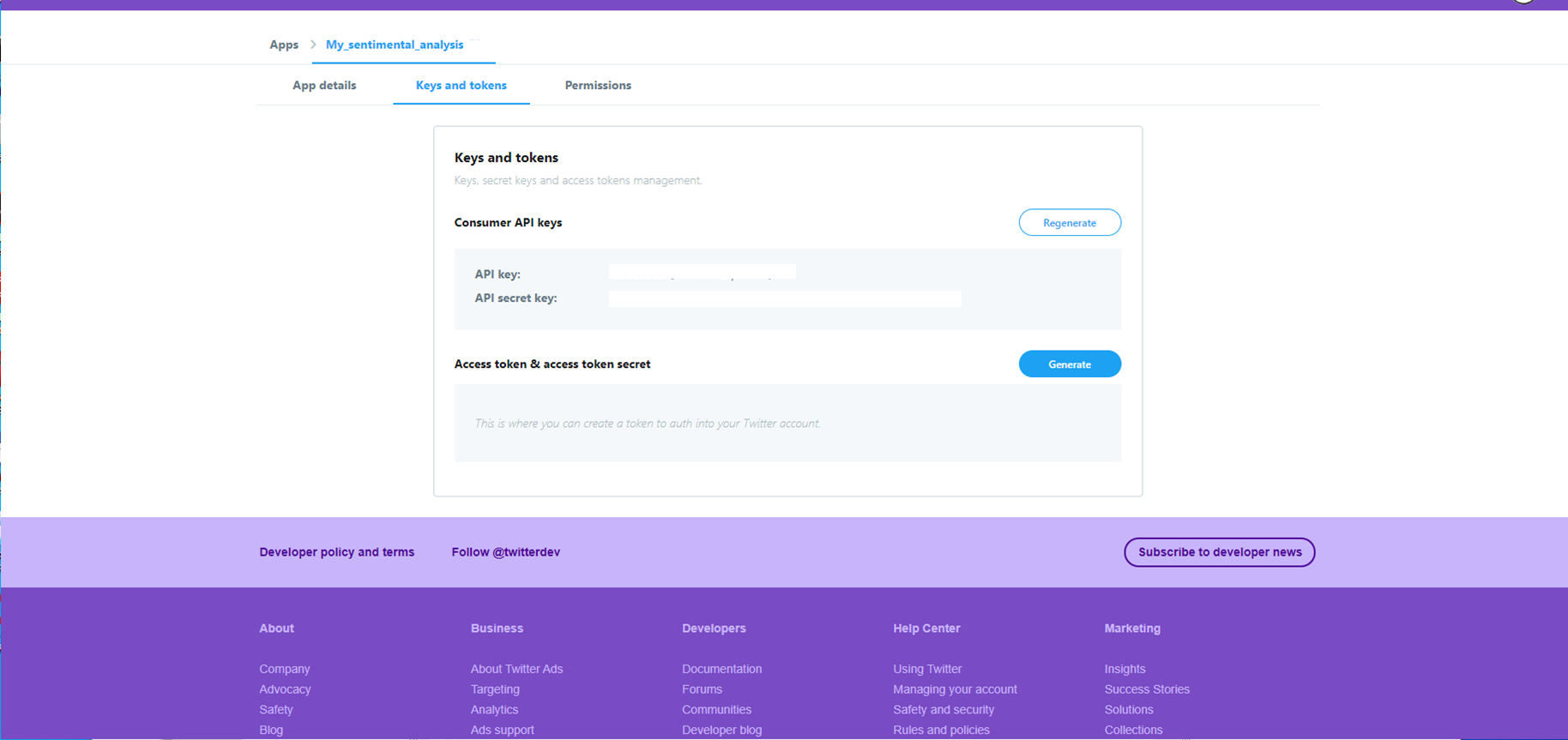
These four credentials are what your PHP program uses to authenticate with the Twitter API. Store them securely — they grant full access to the API on your behalf.
Installing the Twitter OAuth Library
Twitter’s API requires OAuth authentication. Rather than implementing the OAuth handshake manually, I used the abraham/twitteroauth library, installed via Composer:
# Install Composer
curl -sS https://getcomposer.org/installer | php
mv composer.phar /usr/local/bin/composer

# Install the Twitter OAuth library
cd /path-to-project-directory/
composer require abraham/twitteroauth
Implementation
The full source code is on GitHub. Here I will walk through the key parts.
Configuration (config.php)
The configuration file holds the Twitter API credentials and analysis parameters:
<?php
// Twitter API credentials
define('TWITTER_API_KEY',    'your-api-key');
define('TWITTER_API_SECRET', 'your-api-secret');
define('ACCESS_TOKEN',       'your-access-token');
define('ACCESS_SECRET',      'your-access-token-secret');

// Analysis parameters
define('SEARCH_COUNT', 100);
define('PERMIT_ONLY_ADJECTIVE', 1);
The PERMIT_ONLY_ADJECTIVE flag controls whether the analysis considers all parts of speech or only adjectives. Adjectives tend to carry the strongest emotional signals (“beautiful”, “terrible”, “amazing”), so filtering to adjectives only can reduce noise from emotionally neutral words like nouns and verbs.
Fetching Tweets (main.php)
The core logic creates a TwitterOAuth instance and queries the Standard Search API:
// Create TwitterOAuth instance
$obj = new TwitterOAuth(
    TWITTER_API_KEY,
    TWITTER_API_SECRET,
    ACCESS_TOKEN,
    ACCESS_SECRET
);

// Search for recent tweets matching the keyword
$options = array(
    'q'           => $keyword,
    'lang'        => 'en',
    'result_type' => 'recent',
    'count'       => SEARCH_COUNT
);

$json = $obj->get("search/tweets", $options);
The search/tweets endpoint returns recent tweets matching the query. The lang parameter filters to English tweets, and count controls how many results to retrieve (up to the API’s rate limit of 180 requests per 15-minute window on the free tier).
Sentiment Scoring
After retrieving tweets, the program:
- Feeds each tweet through MeCab for morphological analysis
- Extracts words (optionally filtering to adjectives only)
- Looks up each word in the sentiment dictionary
- Sums the scores to produce an overall sentiment value
$feelings = new Feelings(PERMIT_ONLY_ADJECTIVE);The Feelings class encapsulates the dictionary lookup and scoring logic. A positive total score indicates overall positive sentiment; a negative score indicates negative sentiment. The magnitude reflects the strength of the expressed emotion.
Running the Program
Launching index.php in the browser presents a simple interface for entering a search keyword:
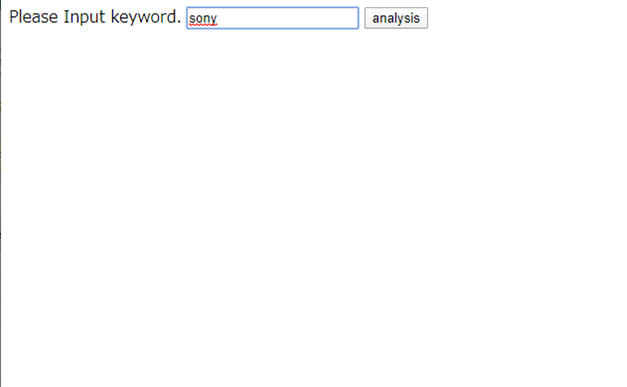
After submitting a keyword, the program fetches matching tweets, runs the morphological analysis and dictionary scoring pipeline, and displays the aggregated result:
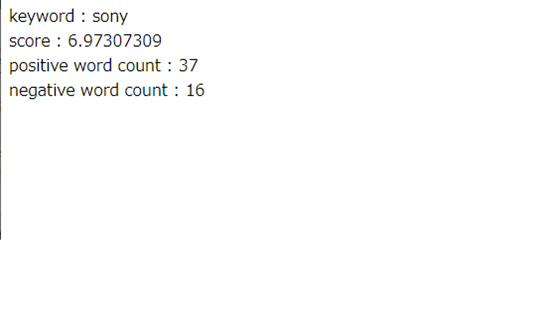
A positive score indicates that the collected tweets about that keyword express overall positive sentiment. A negative score indicates overall negative sentiment. The score’s magnitude reflects how strongly the sentiment leans in either direction.
Limitations and Future Directions
The dictionary-based approach has clear strengths: it is transparent, deterministic, and easy to debug. You can trace exactly which words contributed to a given score. However, it also has significant limitations:
- No context awareness: The phrase “not good” contains the word “good” (positive), but the sentence is negative. A dictionary-based approach cannot capture negation or sarcasm.
- Fixed vocabulary: Words not in the dictionary receive no score, effectively being ignored. Slang, neologisms, and domain-specific jargon are invisible to the system.
- No learning: The system cannot improve with more data. Its accuracy is bounded by the quality and coverage of the dictionary.
For more accurate sentiment analysis, deep learning approaches — such as fine-tuned transformer models — can learn contextual meaning, handle negation, and adapt to new vocabulary. These methods require substantially more infrastructure (training data, GPU compute, model serving), but they represent the current state of the art in NLP.
This project served as a valuable exercise in understanding the fundamentals: how text is tokenized, how sentiment is quantified, and how external APIs can be integrated into a working analysis pipeline. These foundational concepts remain relevant regardless of which technique you ultimately choose.
Source code: github.com/matu79go/sentiment